How to Create Strong Passwords (and Why You Need a Password Manager)
What makes a password strong, why reuse is the real danger, and how to start with a password manager in one sitting. Based on CISA guidance.
What makes a password strong, why reuse is the real danger, and how to start with a password manager in one sitting. Based on CISA guidance.
You are told to use a long, unique password for every account, and you cannot possibly remember that many. This guide explains what CISA means by a strong password, how a password manager solves the memory problem, and how to start without redoing every account in one evening.
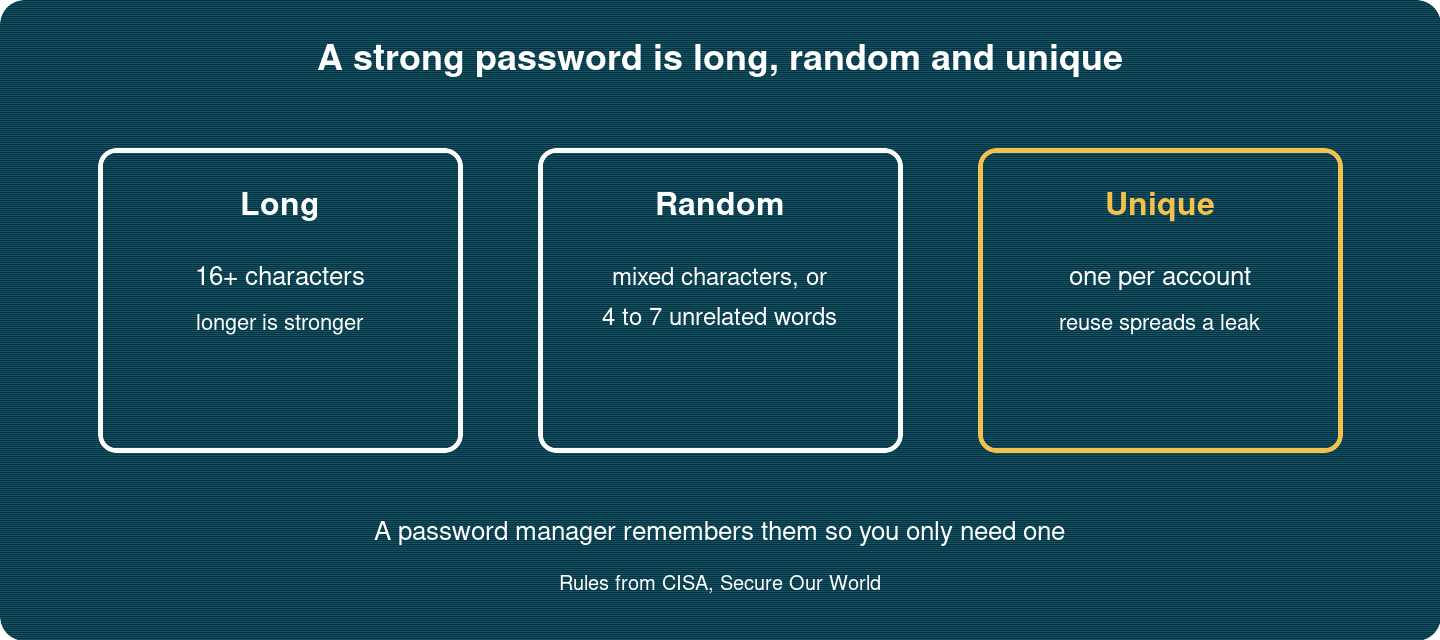
CISA says a strong password follows all three of these rules:
Simple passwords such as 12345, and anything built from a birthday or pet name, are not safe for accounts holding personal information. CISA compares an easy password to locking the door and leaving the key in the lock.
CISA tells the story of a woman who got a text from her bank about a $700 transfer she had not asked for. She could not log in to cancel it, and could not reach her email to reset the password. She had used the same password on both accounts, and it had been part of a company breach posted online. Reuse turned one leak into two compromised accounts. If you only fix one habit, make it unique passwords, with the strongest ones on your email and bank.
A password manager is a program that generates, stores and fills in your passwords. CISA lists what it can do for you:
You then remember only one password, the one for the manager itself. CISA suggests making that a long memorable passphrase.
CISA says some are free, such as the built-in password manager in your web browser, and some cost money. It suggests checking a trusted source such as Consumer Reports for highly rated options and reading reviews. I do not recommend a specific product here, because that would need current testing this guide does not do.
CISA says passwords should not be saved in a plain file on a computer, and recommends a password manager instead. A notebook kept at home is a different risk from a file on a device that can be hacked, but a manager is easier to keep unique and up to date.
CISA notes that your email, bank, healthcare provider and other important accounts should enforce strong password rules. If a service lets you use a short password or a dictionary word, you can ask them why. Meanwhile, use the longest password it accepts.
Related: how to spot a phishing text, because a strong password does not help if you type it into a fake page.