Android Unknown Tracker Alert: What It Means and What to Do
What the alert means, how to play a sound to find the tracker, and why turning off Bluetooth does not stop it. Based on Android Help.
What the alert means, how to play a sound to find the tracker, and why turning off Bluetooth does not stop it. Based on Android Help.
An unknown tracker alert on an Android phone means a Bluetooth tracker that is not yours may be moving with you. Google's Android Help page explains what it means and what to do. This guide follows that page and is for Android 6 and up.
A tracker, also called a tag, is a small Bluetooth device you can attach to keys or a backpack to find them when lost. Some headphones and earbuds also have tracking. Google notes they can be misused to track people without consent.
An alert is sent when someone else's tracker is separated from its owner and far away from them, near your phone. Google says you may get it if you borrow an item or travel with someone who has a tracker with them.
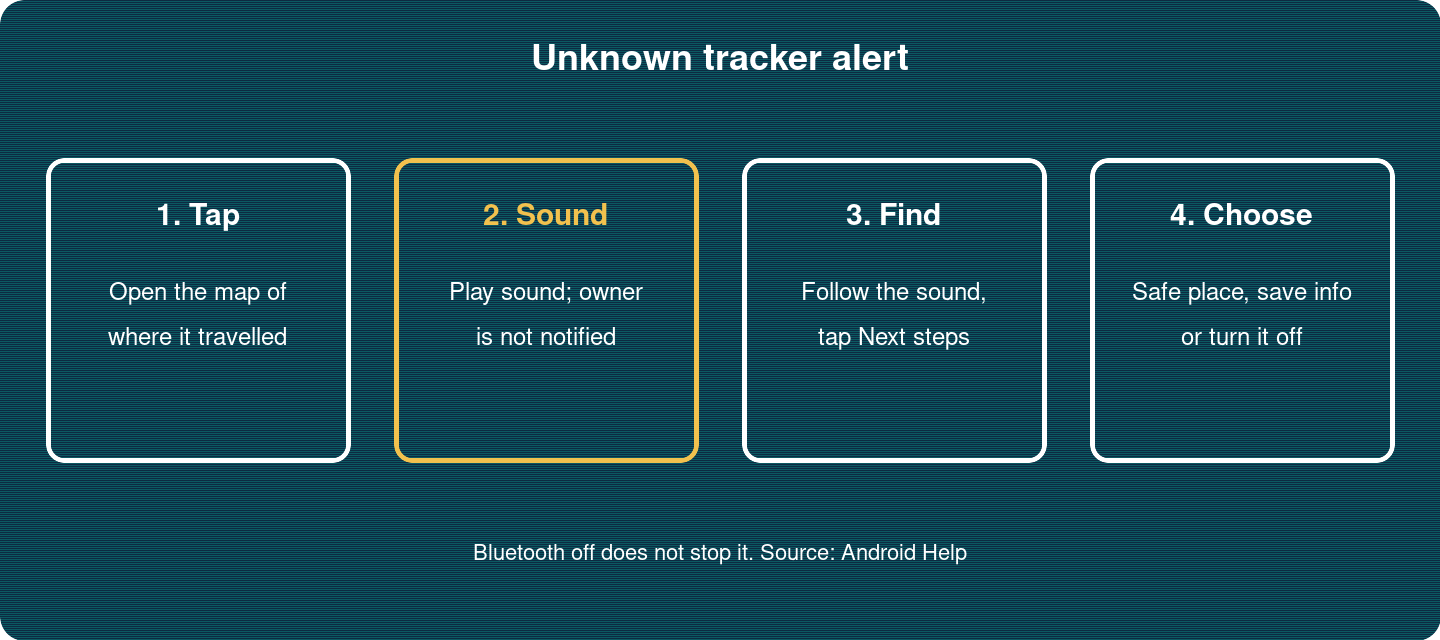
After you find it, Google lists three options: go to a safe public location and contact law enforcement or a trusted contact if you feel unsafe, get and save the tracker's information, or turn it off using the manufacturer's instructions.
Google is explicit: turning off Bluetooth or location services, or turning on Airplane mode, does not stop the tracker from sharing its location with its owner. To turn it off, follow the manufacturer's instructions. Also, the map does not show where the owner checked the tracker's location.
You get an alert after a weekend away with friends. Check whether someone's bag or the borrowed car keys hold a tag. Tap Play sound, find it, tap Next steps and read the tracker's details. If it is not explained and you feel unsafe, go to a public place and contact someone you trust or the police. That ordering is Google's list, not mine. For iPhone users see AirTag alert: found moving with you, and for your own lost phone see find a lost Android phone.