Connect to and Share Wi-Fi on Android, Including Hidden Networks
Connecting, adding a hidden network, sharing with a QR code, and forgetting a saved network. Based on Android Help.
Connecting, adding a hidden network, sharing with a QR code, and forgetting a saved network. Based on Android Help.
Android connects to saved networks automatically, and it can share a network with a QR code. Google's Android Help page covers connecting, adding hidden networks, sharing and forgetting. Some steps work only on Android 12 and up.
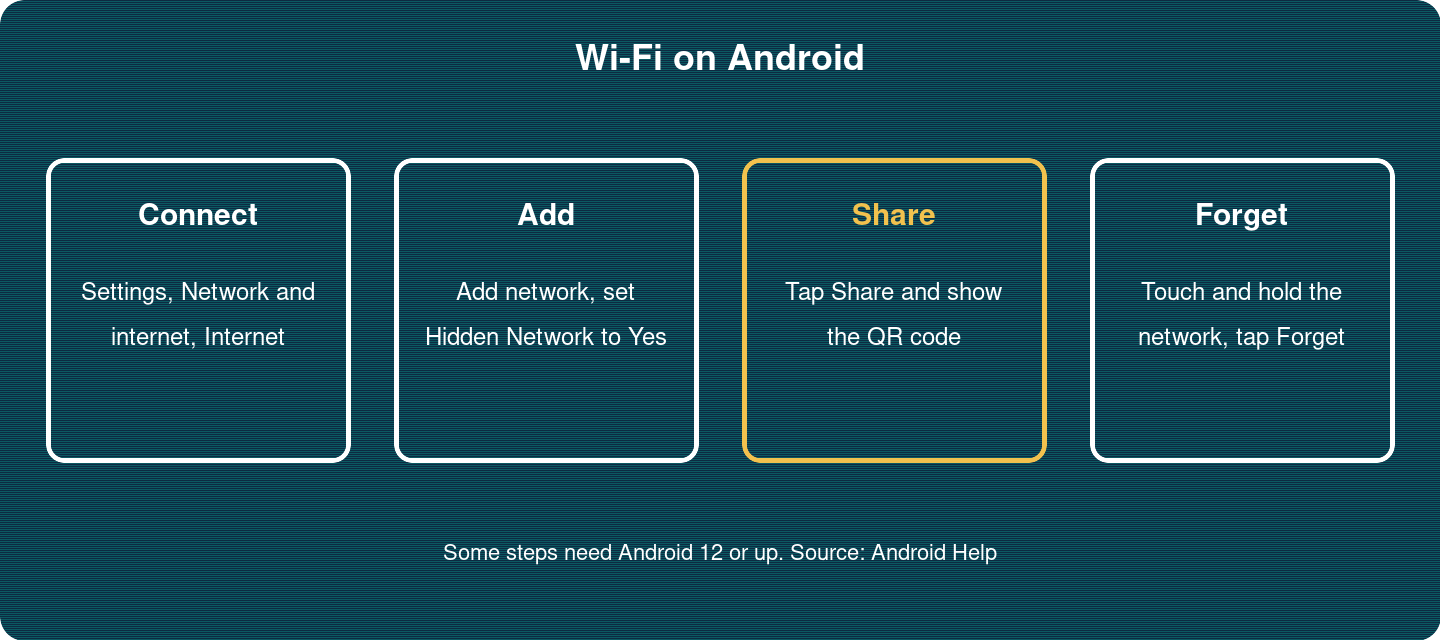
After you connect, the network is "Saved" and the phone joins it automatically when nearby with Wi-Fi on. You can also swipe down from the top and tap Internet to pick a network from the Internet panel.
Wait for the list to refresh first. Otherwise tap Add network at the bottom, enter the network name (SSID) and security details. If the network is hidden, tap Advanced options and set Hidden Network to Yes, then Save.
To disconnect, tap the Wi-Fi settings icon beside the connected network, then Disconnect. To remove a saved network, touch and hold it and tap Forget.
A friend visits and wants Wi-Fi. Open the Share screen and let them scan the QR code. Anyone who scans the code gets the network, so show it only to people you want on it. That caution is mine. If a public hotspot sends a "connect" notification, think before joining: see is public Wi-Fi safe. If the connection fails after joining, see Android no internet fixes. For iPhone users: share Wi-Fi password from iPhone.